
WooCommerce Sales Analytics kaddora Plugin 🎀
User Documentation: 📜
WooCommerce Sales Analytics Kaddora Plugin is a lightweight analytics plugin that provides a simple and fast sales reporting dashboard for WooCommerce stores. A lightweight WooCommerce sales analytics dashboard with sales metrics, charts, top products, date range filters, and CSV export.
📑 Table of Contents
1. Introduction 🎗️
WooCommerce Sales Analytics Kaddora is a lightweight analytics plugin that provides a simple and fast sales reporting dashboard for WooCommerce stores.
The plugin helps store owners quickly understand sales performance without navigating complex reports.
- Total sales overview
- Total orders count
- Average order value
- Sales trend chart
- Top selling products
- Flexible date range filtering
- CSV report export
2. Requirements & Compatibility 📌
- Minimum Requirements
| WordPress 5.8 or higher |
| PHP 7.4 or higher |
| HTTPS recommended (for clipboard & API features) |
- Tested Compatibility
| WooCommerce HPOS Yes |
| WooCommerce 9.x Yes |
| WordPress 6.x Yes |
3. Plugin Installation 🦚
Method — Upload ZIP
- Go to the WordPress Dashboard –
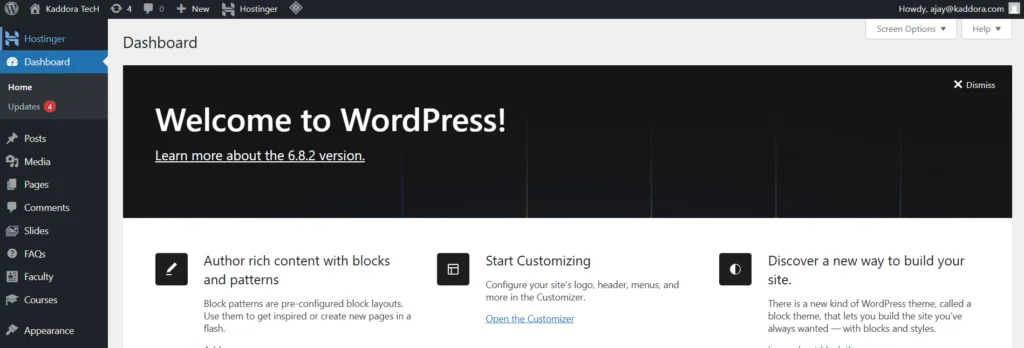
- Plugins → Add New →
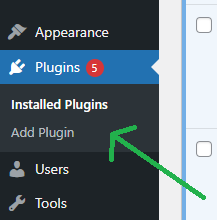
- Upload Plugin > Choose the woocommerce-sales-analytics-kaddora.zip plugin file and click Install Now.

- After successfully Installation & Activation of plugin, you will see ‘WooCommerce Sales Analytics Kaddora’ in your installed plugin section, here you can check version and description about the plugin

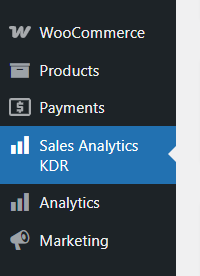
- In WordPress dashboard, under the WooCommerce plugin menu- you can see ‘Sales Analytics KDR’ option available, click on it and access the setting part of the Plugin-
4. Settings (Admin Panel) 🛠️
The plugin does not require configuration. After activation, a new admin menu will appear: Sales Analytics
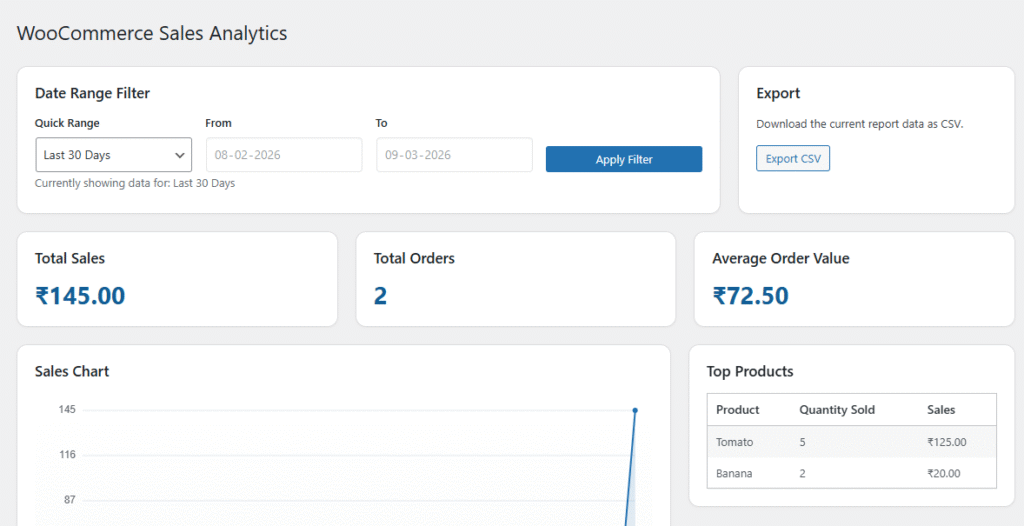
The dashboard automatically loads analytics based on WooCommerce orders.
5. Dashboard Overview 📲
The analytics dashboard contains several sections.
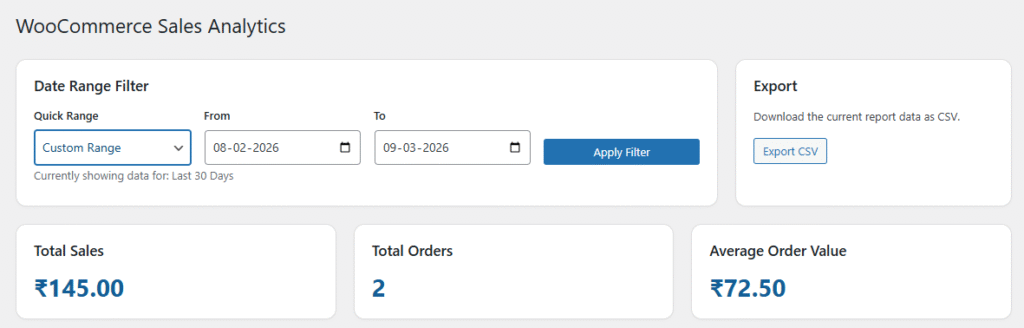
Date Range Filter : Allows filtering analytics data by time period.
Key Metrics : The dashboard displays three main performance metrics.
- Total Sales Displays total revenue generated in the selected period.
- Total Orders Displays the number of completed and processing orders.
- Average Order Value Shows the average revenue per order.
CSV Export : Users can download the report as a CSV file.
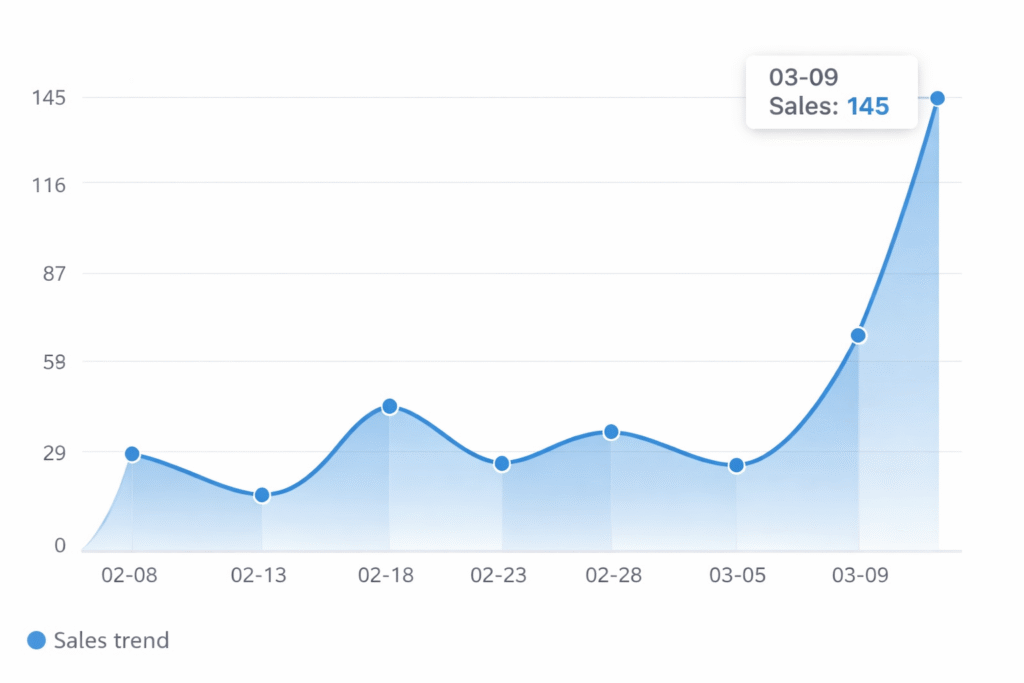
Sales Chart : A visual line chart showing daily sales trend.
Features:
- Daily data points
- Responsive rendering
- Automatic scaling
- Empty state handling
Top Products : Displays the best-selling products for the selected period.
6. How It Works (Workflow) 📶
The plugin follows a simple workflow.
WooCommerce Orders
↓
Reports Engine
↓
Dashboard Metrics
↓
Charts + Top Products
↓
Optional CSV Export
Analytics Calculation– Metrics are calculated using WooCommerce order data:
| Metric | Source |
|---|---|
| Total Sales | Order Totals |
| Total Orders | Order Count |
| Average Order | Calculated |
| Top Products | Order Items |
7. Shortcodes Guide 🎯
Version 1.0 does not include frontend shortcodes.
8. Performance & Caching ↗️
The plugin is designed to be lightweight and efficient. Performance Features-
- Uses WooCommerce order APIs
- Avoids heavy SQL queries
- Loads scripts only on plugin page
- Minimal JavaScript footprint
9. Troubleshooting 🔱
Dashboard shows zero sales
Possible reasons:
- No orders exist in the selected range
- Orders are not in processing or completed status
- Date range is incorrect
Chart not displaying
Possible causes:
- No sales data in selected range
- JavaScript disabled in browser
- theme/admin script conflict
CSV export not working
Check:
- User has manage_woocommerce permission
- Security nonce is valid
- No output before headers
10. FAQ 🌐
Q. Does it support WooCommerce HPOS?
A. Yes. The plugin uses WooCommerce APIs compatible with High-Performance Order Storage.
Q. Can I export reports?
A. Yes, Reports can be downloaded as CSV files.
Q. Does it support subscriptions?
A. If subscriptions create normal WooCommerce orders, they will be included in reports.
11. Support & Updates 🚒
Plugin Updates- Future versions may include:
- advanced analytics
- monthly comparison
- category reports
- revenue forecasting
- REST API support
- frontend dashboards
Supports- For support or feature requests contact:
- WordPress version
- WooCommerce version
- PHP version
- plugin version
- error logs (if available)
Thank you for connecting Kaddora Tech ❤️