
Kaddora Shield: Advanced Login Security & Guard Plugin
User Documentation: 📜
A modern, interactive login security guard WordPress plugin featuring brute force protection and real-time threat monitoring.
📑 Table of Contents
1. Introduction 🎗️
Kaddora Shield is a lightweight yet powerful security solution designed by KaddoraTech to protect your WordPress login gateway. Unlike bulky security suites, Kaddora Shield focuses on the most vulnerable entry point: the login page. It combines intelligent Brute Force protection, Geo-Fencing, and Email-based Two-Factor Authentication (2FA) into a single, interactive dashboard.
2. Requirements & Compatibility 📌
- Minimum Requirements
| WordPress 5.8 or higher |
| PHP 7.4 or higher |
| HTTPS recommended (for clipboard & API features) |
3. Plugin Installation 🦚
Method — Upload ZIP
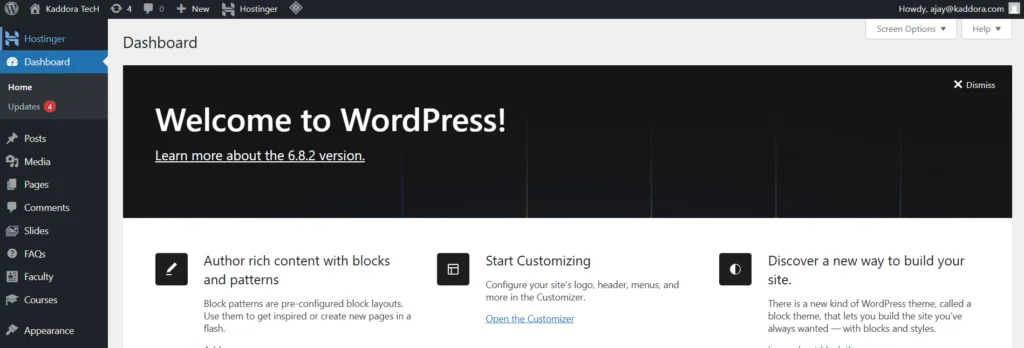
- Go to the WordPress Dashboard –
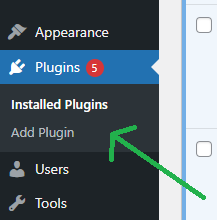
- Plugins → Add New →
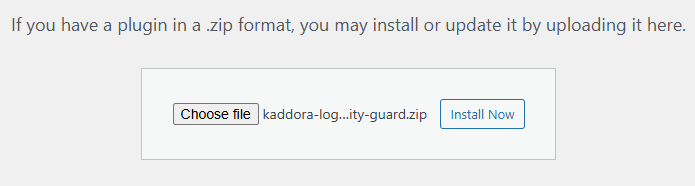
- Upload Plugin > Choose the kaddora-login-security-guard.zip plugin file and click Install Now.
- After successfully Installation & Activation of plugin, you will see ‘Kaddora Shield: Advanced Login Security & Guard’ in your installed plugin section, here you can check version and description about the plugin.

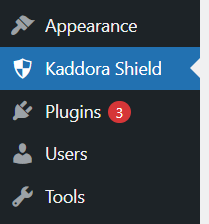
- In WordPress dashboard, under the WooCommerce plugin menu- you can see ‘Kaddora Shield’ option available, click on it and access the setting part of the Plugin-
4. Settings (Admin Panel) 🛠️
The configuration is split into three main modules:
- Brute Force Guard: Toggle this ON to track failed login attempts.
- Max Login Attempts: Define how many times a user can fail before their IP is blocked (Default: 5).
- Lockout Duration: (System Standard: 30 minutes) The time an IP remains “Red Flagged” before being allowed to try again.
- Save Configuration: Always click this button to commit your changes via our secure REST API.
5. Dashboard Overview 📲
The Kaddora Shield Dashboard is built with a Real-Time Security Feed:
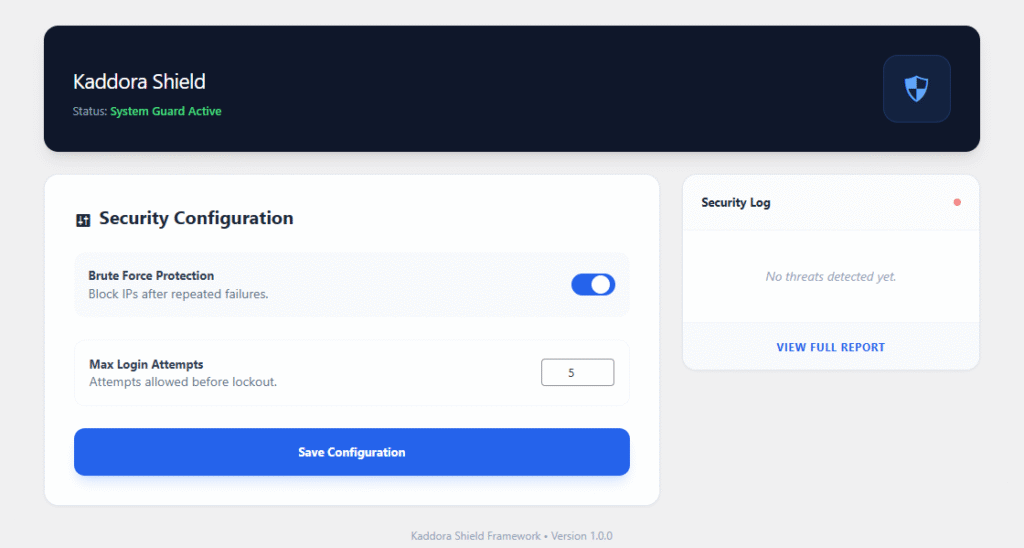
- Status Indicator: A pulsing green/red light showing if the Guard is active.
- Security Log: A live list of the last 5 security events. It shows the Event Type (e.g., Brute Force), the IP Address, the Username targeted, and Relative Time (e.g., “5 mins ago”).
- Responsive Design: Fully accessible from mobile devices via the Tailwind-powered UI.
6. How It Works (Workflow) 📶
- The Interceptor: When a user lands on
wp-login.php, Kaddora Shield checks their IP against the Geo-Fence blocklist. - Authentication: If the IP is safe, the user enters their credentials.
- 2FA Trigger: If credentials are correct, the standard login is paused. A 6-digit code is sent to the user’s registered email.
- Verification: The user must enter the code within 10 minutes to gain access.
- Failure: If the login fails, the Brute Force Guard increments the attempt count. At the limit, the IP is added to the temporary “Lockout” list.
7. Shortcodes Guide 🎯
Kaddora Shield is primarily an automated background guard, but it offers the following utility:
[kaddora_ip]: Displays the visitor’s current IP address (Useful for support or “Contact Us” pages).[kaddora_status]: Displays whether the site is currently being protected by Kaddora Shield.
8. Performance & Caching ↗️
- Database Efficiency: We use a custom table for logs to prevent bloating your
wp_optionstable. - Object Caching: Security status and IP lookups use WordPress Transients, which are compatible with Redis and Memcached for ultra-fast performance.
- Zero-Weight UI: We use a Tailwind CDN approach to ensure no heavy CSS files are loaded on your frontend.
9. Troubleshooting 🔱
- Locked out of your own site? Connect via FTP, go to
/wp-content/plugins/, and rename thekaddora-login-securityfolder to anything else. This disables the guard. - 2FA Email not arriving? Ensure your WordPress site is configured to send emails. We recommend using an SMTP plugin (like WP Mail SMTP) for 100% delivery.
- Dashboard not loading? Ensure your REST API is not blocked by another security plugin or a “Coming Soon” page.
10. FAQ 🌐
Q: Does this block Googlebot or SEO crawlers?
A: No. Kaddora Shield only monitors the login page (wp-login.php). Your public content remains fully accessible to search engines.
Q: Where are the logs stored?
A: In your database under the wp_kaddora_logs table.
Q: Is my site slowed down by Geo-Fencing?
A: No. We cache country lookups for 24 hours per IP to ensure zero impact on page load speed.
11. Support & Updates 🚒
For technical support, bug reports, or feature requests:
Updates: Updates are delivered via the WordPress Dashboard. Always keep your plugin updated to stay protected against the latest 2026 security threats.
Thank you for connecting Kaddora Tech ❤️